
Ad Units: The Building Blocks of Digital Ad Inventory
An ad unit is the configured container that requests and displays an ad. Learn how units differ from formats and creatives, how web and app inventory works, and how to choose a setup that can be measured without damaging the user experience.
What is an ad unit?
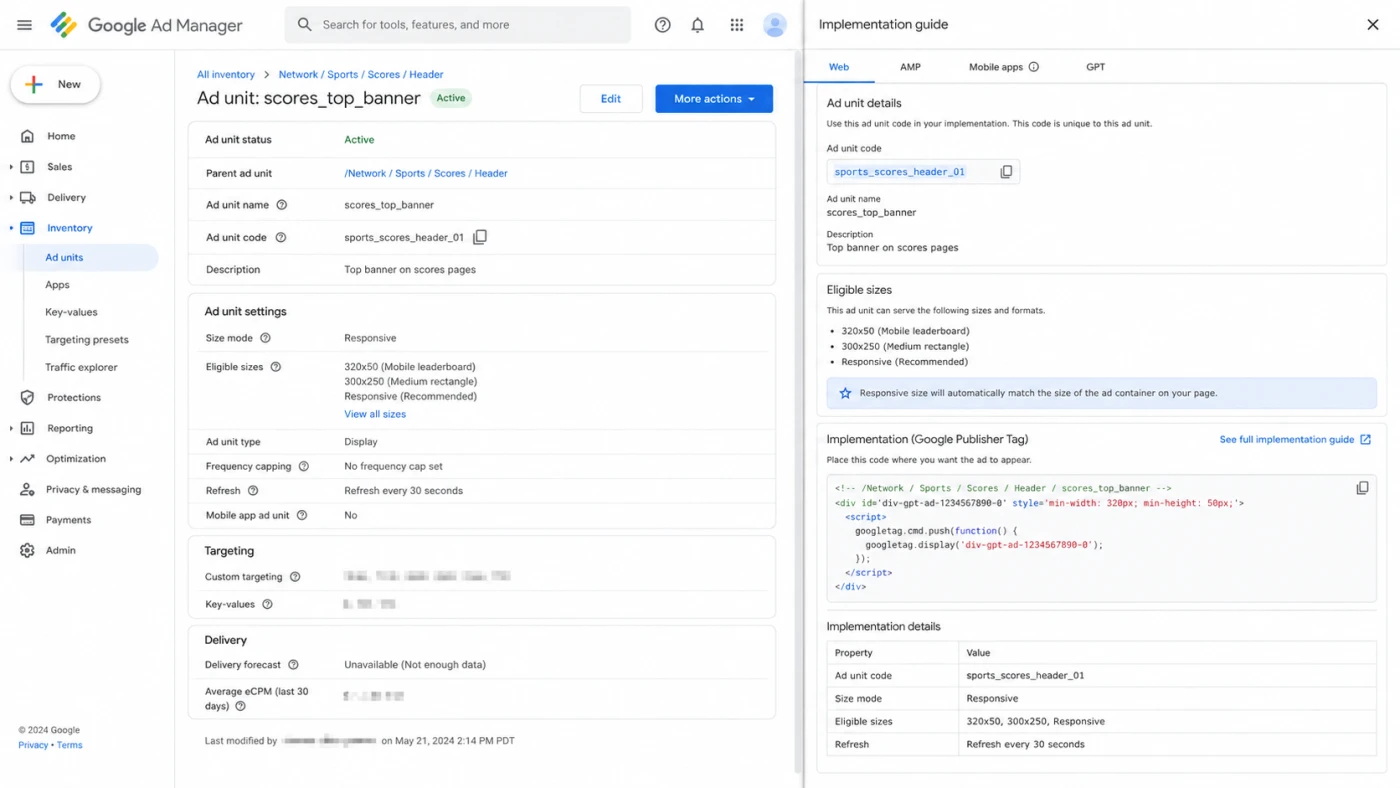
An ad unit is a defined container in a website or app that requests and displays eligible ads. Publishers configure a unit with an identifier and rules such as its location, supported format or sizes, targeting, and delivery settings. Google Ad Manager describes ad units as the spaces where a website or app shows ads and lets publishers organize them in a parent and child hierarchy. See its current guide to creating and configuring an ad unit.
The term names inventory, not the advertisement itself. A unit might be the rectangle below an article headline, an inline native position in a feed, or a full-screen opportunity between game levels. When the page or app reaches that point, its tag or SDK sends an ad request tied to the unit ID.
Inventory
Where can an ad appear?
The unit identifies a stable, reportable opportunity in a property, screen, section, or user flow.
Request
What can serve there?
The implementation declares the unit ID and compatible sizes or format so eligible demand can respond.
Measurement
What happened?
Unit-level reporting connects requests, matched ads, impressions, revenue, and downstream outcomes to one location.
Ad unit, format, type, and creative are different layers
Teams often use these labels interchangeably, which creates trafficking and reporting errors. Google AdMob makes the distinction explicit: the unit is the container, the format describes how the ad appears and where it is located, and the ad type describes the media the unit can show. Its ad unit, format, and ad type guide is a useful reference for mobile apps.
| Layer | Question it answers | Example |
|---|---|---|
| Ad unit | Which inventory container makes the request? | game/results/bottom_banner |
| Placement | Which related units should be targeted or managed together? | All post-level banners |
| Format | How does the experience appear and behave? | Banner, native, interstitial, rewarded, app open |
| Size or spec | Which dimensions or asset rules are eligible? | 300 x 250, fluid native, responsive assets |
| Creative | What message and media does the audience receive? | One image, video, playable, headline, and call to action |
Common ad unit formats for web and mobile apps
Format choice should follow the surface and user moment. The same name can also hide implementation differences between web inventory and an app SDK, so verify support in the serving platform rather than copying a generic format list.
Banner and display
A rectangular unit around or within content. Web slots may accept several fixed or responsive sizes. Mobile apps increasingly use adaptive banners that fit the device width.
Native
The publisher renders supplied assets within its own content layout. Native still requires clear ad disclosure and a unit configured for fluid or native inventory.
Interstitial and app open
Full-screen units tied to a transition or return moment. Their interruption cost makes timing, close behavior, and frequency part of the product decision.
Rewarded and rewarded interstitial
A value-exchange format. Rewarded ads are user initiated, while rewarded interstitials require an advance reward message and an opt-out path.
Google Ad Manager currently lists banner, native, in-stream, interstitial, rewarded, app open, and anchor inventory among its supported formats. For apps, its documentation explains the implementation and creative differences across mobile app formats and sizes. For web or video inventory, consult the relevant platform specification rather than assuming that a mobile SDK unit maps directly to a browser slot.
How to choose the right ad unit
Start with the user journey, then assess demand and technical support. Expected revenue alone cannot tell you whether an interruption is appropriate or whether the implementation will remain maintainable.
- 1
Map the moment
Identify whether the user is reading, scrolling, waiting, finishing a task, returning to the app, or choosing to exchange attention for a reward.
- 2
Set the experience boundary
Choose inline, persistent, full-screen, or opt-in behavior. Define when the unit may load and when it may actually show.
- 3
Check supply compatibility
Confirm SDK, browser, player, consent, size, orientation, and demand-source support before building the placement.
- 4
Define a guardrail
Pair revenue goals with limits for latency, frequency, retention, accidental clicks, and content obstruction.
- 5
Test one variable
Compare a clear unit or format change against a stable baseline. Avoid changing position, frequency, floor, and creative mix at once.
Before selecting a format mix, review how competitors adapt concepts across channels in the ad creative guide. A competitive view can suggest formats worth testing, but it cannot reveal a publisher's internal retention tradeoffs or prove that a placement will work in your product.
How to structure and implement ad inventory
A durable inventory map separates stable product locations from temporary campaign logic. Use unit codes that describe the property, screen or section, position, and format. Group units with placements when they need shared targeting, but do not create a new unit for every campaign or creative variation.
Example taxonomy
property / screen / position / format / environment
For example: game / results / bottom / banner / prod. Keep the unit ID stable if the placement remains conceptually the same, and store experiments in reporting dimensions or test configuration.
- Reserve layout space: reduce content movement when web ads render asynchronously.
- Declare compatible inventory: keep unit configuration, tag or SDK format, and creative eligibility aligned.
- Use test ads: test lifecycle callbacks, rotation, orientation, failure states, and consent before production traffic.
- Document ownership: record who can change floor, frequency, refresh, and mediation settings.
How to measure ad unit performance
Read the funnel from opportunity to outcome. A unit with high revenue but weak request coverage has a different problem from one with many filled requests but poor viewability or user loss.
| Signal | What it diagnoses | Useful comparison |
|---|---|---|
| Ad requests and match rate | Whether the unit creates eligible opportunities and demand can answer them | Same market, device, consent state, and time period |
| Impressions and show rate | Whether loaded ads actually reach the platform's display event | Load failures, abandoned screens, and lifecycle timing |
| Viewability | Whether measurable web or app impressions had a sufficient chance to be seen | Same format and placement behavior |
| eCPM and revenue | The value generated per thousand impressions and in total | Revenue together with request volume and user exposure |
| CTR and conversion | Interaction and advertiser outcome after exposure | Comparable creative, audience, attribution, and format |
| Retention and latency | The product cost of the monetization setup | Guardrail trend by cohort, session depth, and app version |
An impression is a platform-defined counting event, not proof of attention. Use the related ad impression definition before comparing show rate, CPM, or viewability. If several demand partners compete for the same app inventory, the ad mediation guide explains the extra auction and reporting layer.
User experience and policy risks
Format labels do not make an implementation safe. Placement timing, density, disclosure, close controls, content obstruction, and accidental-click risk determine whether the experience is acceptable. Google's app interstitial guidance says full-screen ads belong at natural transitions and warns that surprising users or showing too many units can increase accidental clicks. Review the current interstitial placement guidance before release.
Healthy guardrails
- Clear ad labeling and usable controls
- Natural, predictable display moments
- Frequency and density limits
- Separate monitoring for retention and latency
Warning signs
- Ads appearing under an expected tap target
- Multiple ads visually occupying one slot
- Full-screen units interrupting active input
- Revenue gains paired with session or retention loss
Multiple legitimate units may appear on one page, but layering several ads in the same visual space is a separate abuse pattern. See what ad stacking means and how to detect it.
Ad unit FAQ
What is an ad unit?
An ad unit is a defined container in a website or app that requests and displays eligible ads. It usually has its own identifier and configuration, including location, supported format or sizes, targeting, and delivery settings.
Is an ad unit the same as an ad format?
No. The ad unit is the configured inventory container. The format describes how an ad appears and behaves, such as banner, native, interstitial, rewarded, or app open. One ad unit is normally configured for one format in mobile apps, while a web ad unit may accept several eligible sizes.
Can one ad unit support multiple ad sizes?
Yes, when the serving platform and page implementation allow it. Google Ad Manager can associate multiple sizes with a web ad unit, while the publisher tag must also declare the creative sizes eligible for the specific slot. Fluid sizing is used for native inventory.
Which mobile ad unit format should an app use?
Choose from the user flow. Banners suit persistent or inline spaces, native units fit content layouts, interstitials belong at natural transitions, rewarded units require a clear value exchange, and app open units are designed for loading or return moments. Test revenue together with retention, latency, and accidental interaction signals.
How should ad units be named?
Use a stable taxonomy that identifies the product or property, screen or section, position, format, and environment when needed. Avoid campaign names in the unit code because campaigns change more often than inventory. Keep the identifier stable so reporting remains comparable over time.