
How to see how many downloads an app has
Check app downloads on iOS and Android. See where to find your own numbers, what Google Play shows publicly, and how to read a competitor estimate.
Open Candy Crush Saga on Google Play and you’ll see “1B+ Downloads.” Open the same game on Apple’s App Store and there’s no public download count. If you own the app, you can get more detail in Play Console or App Store Connect. If it belongs to someone else, start with what the store shows. Look for a monthly estimate when you need to compare it with another app.
Decide which number you need before you open a dashboard. “How big is this game?” can start with a store badge. “Did it gain ground in October?” needs a period, a market and a measurement you can repeat. The lookup takes a different path in each case.
Where to find app download numbers
| Whose app? | Apple App Store | Google Play |
|---|---|---|
| Your app | Open App Store Connect Analytics. Choose First-Time Downloads or Total Downloads, then set the dates and territories. | Open Play Console Statistics. Pick a user or device metric, then set the dates and countries. |
| Someone else’s app | Use the listing to confirm the app and publisher. Look for a publisher disclosure or a clearly labeled estimate for the period you need. | Read the public Downloads badge for an approximate lifetime scale. Use a disclosure or a labeled estimate for a specific month. |
If you own the iPhone app
Select the app in App Store Connect and open Analytics. Apple’s overview shows Total Downloads, which includes first-time downloads and redownloads. Use First-Time Downloads for a question about first acquisition. If you’re investigating a rise after an update, look at totals and redownloads alongside it. Write down the metric name before exporting. A table labeled only “downloads” is easy to misread a month later. Apple’s App Analytics guide explains the definitions and the available breakdowns.
For a geography question, set the dates and territory before taking the number. For a launch question, look at a comparable period before and after release. If the launch changed availability in one country, isolate that country instead of expecting a worldwide total to tell you what happened there. Keep the same date boundaries when you share the result with a colleague.
If you own the Android app
Select your app in Play Console and open Statistics. Pick the metric for the job. User acquisitions and device acquisitions count different things, and an installed audience answers a question about the people or devices that still have the app. Open the metric description if you’re unsure which one you selected. Then narrow to the country and dates you want and save that scope with the export. Google’s Statistics guide lists the available metrics.
If your team reports iOS and Android together, settle on an explicit definition for each column. A first-time download on Apple and an acquisition metric on Google can both inform a launch review. Keep their labels visible so that an internal comparison stays intelligible.
What the Google Play download badge means
Google Play displayed 1B+ for Candy Crush Saga when we checked on November 23, 2026. Read the badge as a public threshold for that listing. It gives you a sense of scale, with no exact total or month attached. Check that the publisher is King and that the Android package iscom.king.candycrushsaga. Candy Crush Soda Saga has a separate listing. A similar icon or title is an easy way to grab the wrong number.
Apple’s listing identifies the iPhone app with ID 553834731 and gives you ratings, version information and purchase details. Those fields can help you confirm the product. Ratings come from people who leave a rating, and a storefront rank describes a position in a particular chart. Both have their own uses. Neither determines how many times the app was downloaded, because the fraction of people who leave a rating can differ from one app to the next.
There’s a simple way to keep these observations straight. Record “Google Play public badge: 1B+” on one line. If you get a monthly estimate, record the provider, the month and the store on a second line. Even for the same game, the two entries answer different questions. A title’s badge can sit at the same threshold while its monthly downloads rise and fall.
How to check monthly downloads for another app
To compare recent acquisition, choose the month first. A complete calendar month gives you a usable window for comparing apps, especially when one of them launched midmonth. Then choose the same market, store and category for the apps you want to compare.
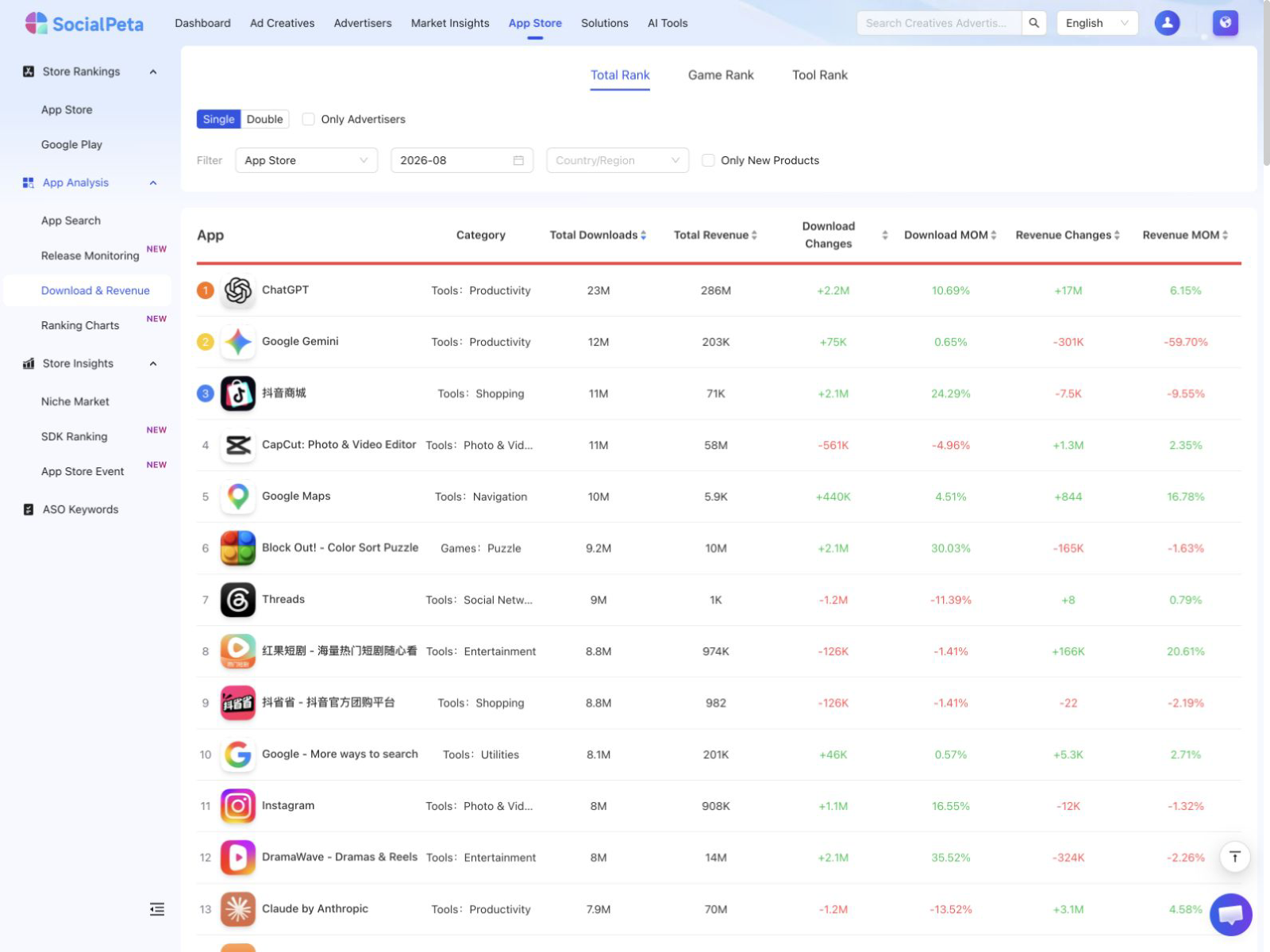
- Open the monthly downloads and revenue charts. The main view covers worldwide App Store games. For ordinary apps, switch to the App Store apps chart or the Google Play apps chart.
- Select a month and market. To reproduce this example, use October 2026, Worldwide, App Store and Games. Keep the category scope the same for each app. Read the Downloads column or list for that view.
- Match the app by name and publisher, then check the store listing if there are regional editions or names that look alike. Record rank and estimated downloads separately. A rank tells you where the app sits in the list. The value tells you the estimated scale.
| Game | Download result | How to report it |
|---|---|---|
| Block Out! - Color Sort Puzzle | No. 1, about 8.4 million estimated downloads. | Attribute the estimate to SocialPeta and keep the month and store with it. |
| Candy Crush Saga | Outside the displayed download top 20. It appeared on the revenue chart. | Record the download value as unavailable in this view. Search for a source with per-app coverage if you need the figure. |
These are observations from the selected month. If the chart opens on a newer month, change the month before trying to reproduce them. If the site shows a saved fallback or an unavailable view, check the date it actually displays before saving a figure. A smaller category or a different market can also produce a different ranking.
Want to run the same comparison in several countries? Open the Download & Revenue workspace and set the store and month before changing the country or category. Work through one scope at a time so you can tell which filter accounts for the change.
How to compare downloads across stores
Suppose one game shows two million estimated October downloads on the App Store and another shows three million on Google Play. You know something about each game on the store you looked at. To decide which one had more reach in the same market, check both games on the same store first. If your question is about Android specifically, run the whole comparison on Google Play. You can then repeat it on iOS and see whether the order holds.
For a cross-store report, preserve the app identifiers and describe exactly what you combined. Some people use both stores on different devices. A sum of platform download counts cannot tell you how many distinct players there were. A sum also depends on coverage. If a title was not offered on one store in the market you chose, record that separately from a missing estimate.
A trend is often the better decision input. If a competitor climbs in three successive months in the same country and store, it may be worth reviewing its release notes, store listing or ad creatives. If the only change was a jump in rank, check the estimated volume before claiming growth. Other apps can move around a title while its own downloads stay fairly steady. The app rankings guide explains the different chart types when you need a second signal.
What to do when an app is missing from the chart
If an app is missing from a top 20 chart, check the store and country first. Then try the listing’s identifier and look for a source that covers that individual app. Publishers occasionally announce install milestones, but a milestone can cover several platforms or years. Record its date and scope before comparing it with another title. If the publisher gives a number for a family of apps, keep the family name alongside it.
For a spreadsheet, give each app a row with the store ID, market, dates, metric, value and source. Add a short note such as public threshold, publisher disclosure, modeled monthly estimate or outside the displayed chart. Where you have no data, leave the value empty. Setting it to zero can quietly turn a coverage gap into a false comparison later.
If you only need a shortlist, that row may be enough. If a decision depends on a very small difference between two modeled figures, collect another month or look for independent evidence. If your next question is whether people pay for the app, use the app revenue guide to find the right income figure for that question.
What a finished lookup looks like
| App and source | Scope and value | What to do with it |
|---|---|---|
| Candy Crush Saga on Google Play | Public badge, checked November 23, 2026. 1B+. | Use it to describe the scale of the Android listing. Keep the threshold symbol in the notes. |
| Candy Crush Saga on the App Store | October 2026 worldwide games chart. Outside the displayed download top 20. | Find per-app coverage or leave the monthly download figure empty. |
| Block Out! on the App Store | October 2026 worldwide games chart. About 8.4 million estimated downloads. | Compare with another title from the same view or repeat that scope for the prior month. |
These notes are short enough to paste into a message, and they still tell the next reader what you checked. If you’re deciding whether Candy Crush is the right game to benchmark, you can already see that it has a sizable Android footprint. If you’re deciding how quickly it is growing today on iOS, you still need a source for that question. A search can end with one good number and one missing number. Keep each attached to the decision it can support.
Timing matters for a newly released app too. A game launched on October 27 had fewer days to gather October downloads than a game available all month. If that difference could change your shortlist, write down the release date and compare the first complete month for each title. Keep the store and market fixed when you make that second pass.
Common questions about app downloads
Can I see how many times an iPhone app has been downloaded?
App Store Connect provides download figures for apps you manage. For someone else’s app, check publisher disclosures or a third-party estimate and note which period and market it covers. The public Apple listing does not display a download counter.
Are downloads the same as active users?
Downloads count activity in a store. Active users measure people using an app within a defined interval. Some new users never return, while existing users can stay active without downloading it again. If you need to compare engagement, look for a disclosed active-user metric with a stated time window.
Can I turn an App Store position into downloads?
The rank alone gives an ordering. It carries no universal volume conversion, and the volume associated with a position can vary by market and period. Use a reported value or a labeled estimate if your decision needs a count.