
Ad publisher research: find the developer behind an app
Research ad publishers through App Store and Google Play developer information. Map related apps, verify developer identities, and compare advertising activity.
Ad publisher research in SocialPeta starts with the developer information shown in the App Store and Google Play. The job is to identify the developer behind an advertised app, examine its associated apps, and investigate their advertising activity. Here, publisher means the store-developer dimension. In wider advertising terminology, the same phrase can mean an owner of advertising space, so establish which meaning a source uses before comparing its data.
Start with the developer behind the advertised app
An ad often makes the product easy to recognize while leaving its developer less obvious. A game title, a Facebook Page name, a store developer name, and a corporate name can all be different. Research becomes more useful when those identities are recorded separately and connected only where evidence supports the relationship.
For this workflow, begin with the destination app. Open its official store listing and record the developer information displayed there. That gives the investigation a concrete reference point. Searching a brand name alone can return similarly named apps, regional versions, unrelated developers, or promotional Pages that are not the store publisher.
A developer-level view helps answer questions an individual ad cannot: which other apps are associated with this developer, whether several products compete in your category, and which products deserve a closer advertising review. It can also reveal that apparently separate reference apps belong to one developer-level research group.
Keep the scope modest. A developer entry is not automatically a complete map of a corporate group, its subsidiaries, agencies, or licensed products. Treat the store relationship as the starting fact and maintain separate evidence for any broader ownership claim. A useful research record can contain unresolved relationships without forcing every app into a neat company tree.
Understand App Store and Google Play developer names
Apple explains that its developer name normally uses the legal name. Organizations can use a registered trade name, DBA, or fictitious business name under the conditions described in its documentation; individuals use their legal name. The developer name appears on App Store product pages. See Apple's developer-name guidance.
Google Play also distinguishes the public developer name from legal identity information. Its account guidance says the developer name can differ from the legal name and can be changed. This matters when matching a current listing with an older research record. Refer to Google Play's required developer information for the platform's own explanation.
These naming systems are not a universal company identifier. Two similar names may represent different entities, and a product's branding may differ from the organization associated with the account. Avoid treating an exact text match as the only evidence needed to merge records across the two stores.
| Identity | What it helps identify | What you should not assume |
|---|---|---|
| App title | The product shown to a user | A unique identifier across stores |
| App Store app ID | A particular App Store record | The current ultimate corporate owner |
| Google Play package name | A particular Android app record | A matching iOS app without verification |
| Store developer name | The displayed developer relationship | A complete corporate group |
| Social advertising Page | An identity used in observed ads | The same entity as the store developer |
When reporting, use wording that matches the evidence: listed under this developer, linked from this official website, or advertised through this Page. Those phrases preserve the relationship you actually established. A broad statement that a company owns every connected product may require evidence beyond the store and ad records.
Create an identity record before comparing portfolios
Record the store URL, app title, app identifier, displayed developer name, developer-page link where available, country or storefront, and observation date. Add the official product website if it helps verify the connection. These fields make it possible to revisit a finding when names or listings change.
Use the developer link from the listing when available instead of relying entirely on a search for the name. Then inspect the associated apps individually. Similar icons, descriptions, or websites are useful leads, but they do not replace a clear store relationship. Preserve a source for every app added to the research set.
For a product present on both stores, check the official website's store links and compare the product details. Record iOS and Android as separate app records connected by a verified product relationship. Do not add their observed ad counts together until you know whether the source counts overlapping creatives separately.
A simple confidence note helps collaborators understand incomplete records. Confirmed store relationship means you saw the app associated with that developer in the official store. Product match supported means official links or other direct evidence connect the two store records. Possible association means further checking is required and the record should not enter an ownership total.
Names should remain readable even when you normalize them for searching. Preserve the original displayed form alongside any simplified search term. Removing punctuation or a company suffix may help find candidates, but it can also erase differences that matter when two developers have similar names.
Find an ad publisher in SocialPeta
Use Publisher Analysis within the Advertisers workflow to search for the developer associated with your reference app. The list supports keyword and publisher-region filtering, sorting, and pagination. Begin with a distinctive portion of the store developer name, then confirm the result against the official listing.
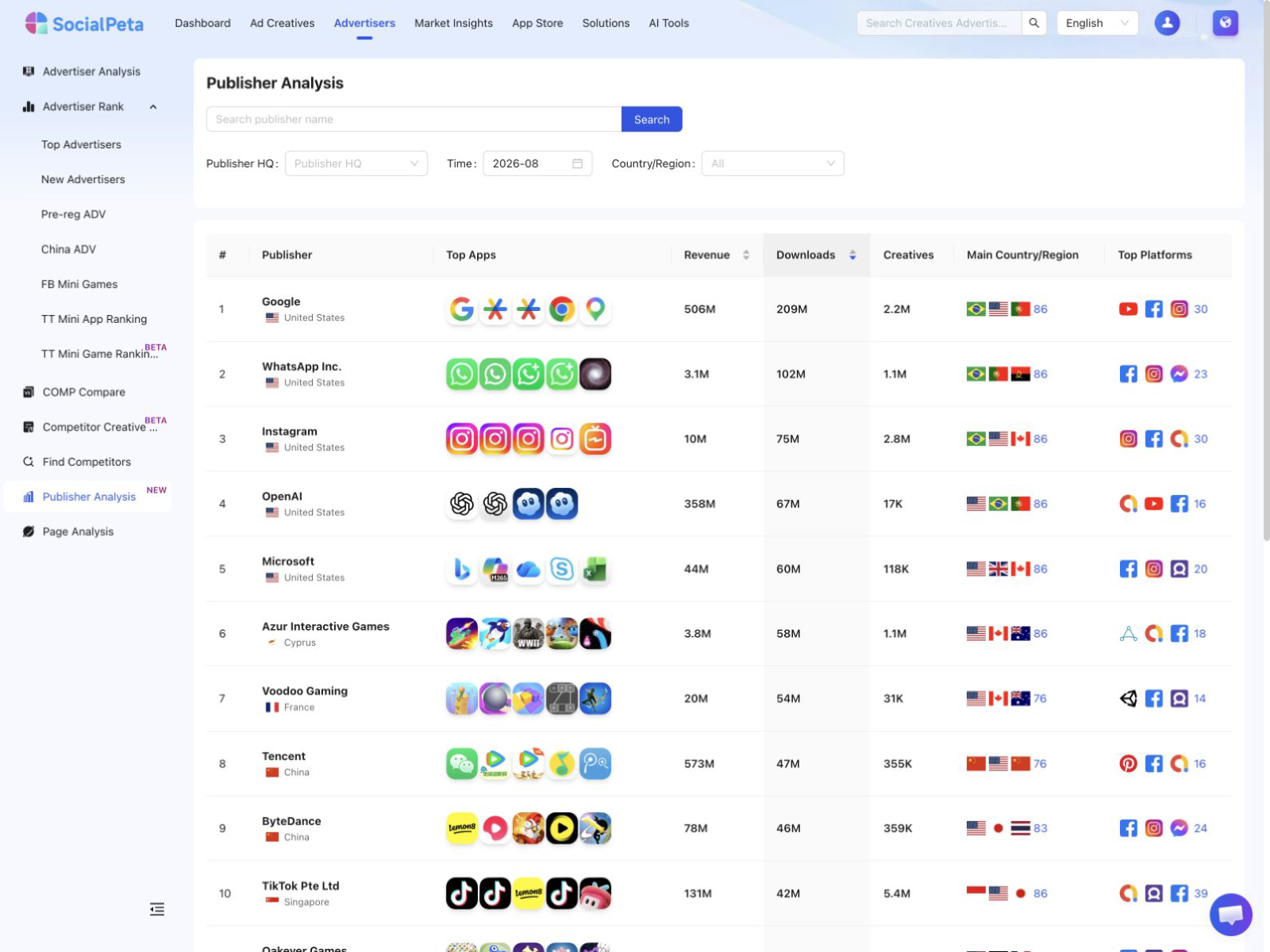
Region is a discovery filter, not proof of where an app's customers live. A developer's recorded region and a campaign's target market answer different questions. If the first search misses the expected developer, broaden the region filter and check naming variants before deciding that the developer is absent.
The publisher detail workflow provides an overview, distribution information, and an app list with pagination. Use the app list to identify products for a deeper review. Access to the detail route depends on the relevant product permission. Do not describe an unavailable panel or a partial list as evidence that the developer has no other apps.
Retain the metric names and definitions supplied by the product. A table screenshot may show columns that look familiar, but its appearance does not establish their calculation method or completeness. Verify the scope before combining values into a developer total or comparing them with reported company revenue.
The next research step is to investigate the selected apps' advertising. For discovery methods and ranking boundaries, use the top advertisers research guide. That transition keeps developer identification separate from judging the marketing behavior of individual products.
Compare a developer's apps on a consistent basis
A portfolio comparison should preserve meaningful differences among apps. Separate operating systems, product categories, markets, business models, and observation periods where they affect the decision. A subscription utility and an ad-supported casual game may share a developer but have very different acquisition requirements.
Choose a question before aggregating. Are you looking for a developer whose products overlap your audience? Are you assessing whether a repeated creative approach appears across related apps? Are you deciding which app deserves a closer review? The useful portfolio fields depend on that question.
For a creative study, build an app-by-app record of visible promises, demonstration styles, offers, and destinations. If several apps use a similar pattern, investigate whether it reflects a shared product advantage or merely a common category convention. A repeated visual treatment alone cannot establish a centralized marketing team or shared campaign budget.
Keep missing observations separate from zero. An app with no matching ads in your selected view may be outside the source's coverage, inactive during that period, associated with another identity, or filtered out. Record the search conditions and the result as no matching observations. That description leaves room for a later correction.
| Portfolio question | Useful comparison | Evidence boundary |
|---|---|---|
| Which products overlap our market? | App purpose, storefront and customer job | Presence does not establish market share |
| Is one product dominating our observed sample? | Comparable activity counts by app | Sample share is not budget share |
| Does the developer repeat a message? | Original creative review across apps | Repetition does not prove performance |
| Is the portfolio changing? | Dated app associations and store records | A new observation is not necessarily a new launch |
Read concentration without calling it spending
Suppose a hypothetical developer has four apps in a fixed research sample, with 120, 60, 15, and 5 observed creatives respectively. The first app accounts for 60% of the 200 observations. That is a useful description of sample concentration if all four counts use the same definition and period.
It is not evidence that the first app receives 60% of the developer's media budget. One creative can receive much more delivery than another. Versions may overlap across products or platforms, and the dataset may not capture every campaign. Keep the denominator in the sentence: share of observed creatives in this sample.
Compare that concentration with the content. The most visible app might be promoting a seasonal offer while another uses a smaller set of evergreen demonstrations. These observations suggest different follow-up questions. They do not establish a developer's internal priorities or explain why resources were allocated that way.
For competitive planning, the practical outcome might be to examine the leading app's offer and one smaller product's distinct approach. That gives the creative team a focused set without pretending that the portfolio table reveals confidential strategy. Add your own test outcomes later so the research becomes more informative over time.
Handle transfers, renames, and regional differences
Developer relationships can change. Apple documents app transfers between App Store Connect accounts, including conditions and responsibilities for the process. Its app transfer overview is a reminder that a current association should not automatically be projected backward onto every historical observation.
When a developer name differs from an earlier record, check the store URL and app identifier first. Then inspect dated official information for a rename, transfer, or other relevant change. Preserve both observations with their dates. Replacing the old name everywhere can make historical research imply a relationship that did not exist at the time.
A product can also have different listings or availability across storefronts. Record the market used for the check and the exact destination reached from the ad. If the ad opens a regional version, investigate that record rather than silently substituting the listing most familiar to your team.
Avoid automatic merging based on a shared domain. An official domain may help connect products, but hosting, licensing, distribution, and brand relationships can vary. Keep the store developer as its own field and attach a broader relationship only when an appropriate source supports it. This is especially useful when a company operates several brands.
Turn developer research into a usable brief
Finish with a concise developer profile containing the verified store identity, selected related apps, the period and market reviewed, notable advertising patterns, and unresolved questions. Link each app to its source record. The brief should let someone else check the relationships without repeating the entire investigation.
Make the recommendation specific. A developer operating several comparable apps may be worth monitoring for creative patterns. A particular product may deserve a destination review. An uncertain identity may need another store check before the team includes it in a presentation. Different findings require different next actions.
Keep product-level evidence under every portfolio conclusion. If the headline says the developer emphasizes a certain benefit, show which selected apps and ads support that statement. Qualify the sample where needed. This prevents one memorable creative from becoming an unsupported claim about every app associated with the developer.
For the next brief, select one verified developer and a small group of relevant apps, record their store identities, and investigate one advertising question. Broader competitive research can then compare the resulting offer and positioning evidence with your own product. The developer lookup provides the research boundary; the individual apps provide the substance.
Frequently asked questions
What does ad publisher mean in SocialPeta?
In this developer research context, ad publisher refers to the developer information associated with an app in the App Store or Google Play. Use that identity to investigate related apps and their advertising activity.
Is a store developer the same as the parent company?
Not necessarily. A displayed developer name can differ from a legal or corporate-group name. Preserve the store relationship and verify broader ownership separately instead of merging records by name alone.
Can I combine an app publisher portfolio across iOS and Android?
You can research both stores, but keep their app identifiers and developer records separate until the product relationship is verified. Check metric definitions and possible overlap before aggregating advertising observations.