
Mobile App Testing: A Practical Strategy for Reliable Releases
Mobile app testing verifies product behavior across code, interfaces, devices, networks, accessibility needs, security controls, and real user journeys. This guide turns those concerns into a release-focused test system.
What is mobile app testing?
Mobile app testing is the process of verifying that an app behaves correctly, remains usable and secure, and performs acceptably across the devices, operating systems, networks, permissions, and real-world conditions it supports. It applies to native, hybrid, and mobile web experiences, but the exact tools and device risks differ.
Testing is broader than finding crashes. A technically stable app can still fail when a user denies a permission, rotates a foldable screen, increases text size, restores a purchase, loses connectivity, or follows an ad promise into the wrong screen. That last handoff also connects testing to an app's broader promotion and activation journey.
A useful test answers four questions
The mobile testing layers
Use many fast, isolated tests for logic and fewer high-fidelity tests for complete journeys. Apple's current Xcode guidance recommends this test-pyramid shape, and Android's official strategy likewise emphasizes early, fast, clear feedback. A UI suite alone is slow to diagnose and too expensive to cover every input.
Unit
Verify isolated logic and boundary conditions quickly.
Run: Every local change and pull request
Integration
Verify modules, storage, APIs, and platform services together.
Run: Pull requests and scheduled suites
UI and journey
Verify that a person can complete critical tasks through the interface.
Run: Critical paths on pull requests, broader regression before release
Exploratory and beta
Find unfamiliar failures and unclear experiences automation did not predict.
Run: Feature review and release candidates
Android and iOS testing use different native stacks
The strategy can be shared, but platform-native automation should follow each ecosystem. Android distinguishes local host tests from instrumented tests that run on devices or emulators. Apple supports Swift Testing for unit and integration tests, while XCTest and XCUIAutomation remain central to UI and performance testing.
| Decision | Android | Apple platforms |
|---|---|---|
| Fast logic checks | Local JVM unit tests | Swift Testing or XCTest unit tests |
| App and UI behavior | Instrumented tests and UI automation | XCTest UI tests with XCUIAutomation |
| Broad device execution | Emulators, physical devices, Firebase Test Lab | Simulators, physical devices, and compatible cloud device labs |
| External beta feedback | Google Play testing tracks | TestFlight groups and feedback |
Read the current Android testing documentation and Apple test target guidance before choosing a framework. A generic tools list ages quickly and does not define what the team needs to prove.
Build a useful device matrix
A device matrix is a risk model, not a collection contest. Start with production telemetry and supported OS versions. Add representative screen classes, low-resource hardware, platform-specific form factors, locales, orientations, and devices required by cameras, biometrics, Bluetooth, graphics, or other hardware-dependent features.
Virtual first
Use simulators and emulators for quick regression coverage, uncommon screen sizes, and repeatable CI runs.
Physical before release
Use real devices for hardware, thermal, memory, rendering, radio, and vendor-specific behavior.
Conditions matter
Exercise offline, loss and recovery, slow connections, backgrounding, interruptions, and permission changes.
Firebase Test Lab documents test matrices across hosted Android and iOS devices, and recommends physical-device runs for significant releases. Google Play's automated pre-launch report can additionally flag stability, compatibility, performance, and accessibility issues, but its crawler does not replace tests for authenticated or business-critical journeys.
A practical mobile app testing workflow
Define release risk
List the user journeys, data, permissions, payments, and device features that would cause material harm if they failed.
Design observable tests
Give every case a known setup, one action or journey, an expected result, and diagnostics that explain a failure.
Run the fastest layer first
Execute static checks and unit tests before integration and UI suites so failures return close to the code change.
Expand across configurations
Run the release candidate on representative devices, OS versions, locales, orientations, permissions, and network states.
Test nonfunctional quality
Measure startup and interaction performance, inspect accessibility, and verify security controls against explicit requirements.
Distribute a beta
Ask representative testers to attempt defined tasks and report context, screenshots, crashes, and unexpected behavior.
Make a release decision
Triaged defects need an owner, severity, reproduction evidence, affected scope, and an explicit fix, defer, or accept decision.
Beta distribution belongs near the end, after deterministic defects are removed. Apple's TestFlight overview explains how builds, tester groups, feedback, sessions, and crashes support pre-release validation. After quality is established, teams can align release notes and store assets with their App Store Optimization work.
Test performance, accessibility, and security explicitly
Functional correctness does not prove that an app is ready. Give each nonfunctional quality area its own acceptance criteria and evidence.
Performance
Measure startup, rendering, responsiveness, memory, energy, and network behavior against a versioned baseline. Investigate regressions by device and app version.
Accessibility
Test text scaling, screen readers, contrast, focus order, target size, orientation, and alternatives to gestures with assistive technology and human review.
Security
Verify storage, cryptography, authentication, authorization, networking, platform interaction, and resilience based on the app's threat model.
W3C explains that existing accessibility standards apply to mobile experiences, including native and hybrid applications. OWASP's Mobile Application Security Verification Standard provides explicit control groups instead of a vague request to “security test” the app. Privacy flows also deserve regression coverage when an app relies on consent or tracking, as explained in our App Tracking Transparency guide.
Interpret results as release risk
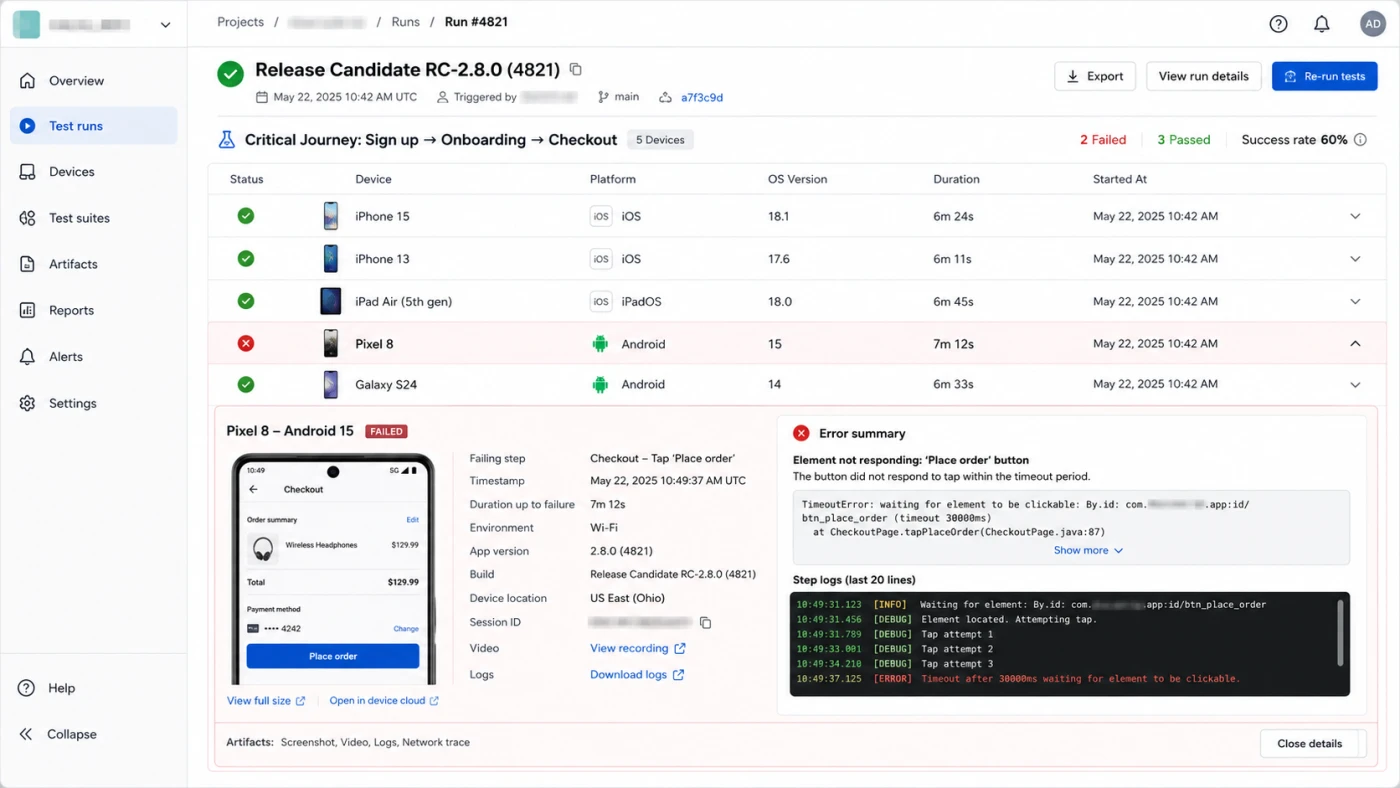
A pass rate is useful only when the suite is stable and tied to meaningful risks. Track failures by affected journey, severity, device and OS, first failing build, reproducibility, and owner. Separate product defects from test defects and infrastructure failures so a green dashboard cannot hide skipped or quarantined coverage.
Release signal
Critical journeys pass on required configurations, no open defect exceeds the release threshold, and performance baselines show no unexplained regression.
Learning signal
Escaped defects become permanent regression cases, and recurring flakes trigger test or architecture work instead of repeated retries.
Common mobile testing mistakes
- Buying tools before defining risks. A vendor cannot decide which user outcome, platform behavior, or security control matters to your product.
- Automating every UI path. Put most combinations below the UI layer and reserve end-to-end tests for valuable journeys.
- Testing only on the newest phone. Real users differ by OS, memory, screen, locale, permissions, and network state.
- Treating flaky tests as harmless. Repeated retries weaken trust and can normalize real race conditions.
- Using production users as the final test stage. Monitoring is necessary, but it should detect residual risk rather than replace pre-release evidence.
Mobile app testing FAQ
What is mobile app testing?
Mobile app testing is the process of verifying that an app behaves correctly, remains usable and secure, and performs acceptably across the devices, operating systems, networks, permissions, and real-world conditions it supports.
What should be automated in mobile app testing?
Automate deterministic, repeatable checks such as unit tests, API contracts, critical user journeys, and regression cases. Keep exploratory testing, subjective usability review, and investigation of unfamiliar failures human-led.
Are emulators and simulators enough for mobile testing?
No. They are fast and useful for broad development feedback, but a release matrix should include representative physical devices because sensors, thermal behavior, memory pressure, vendor software, radios, and rendering can differ from virtual environments.
How do you choose devices for a mobile test matrix?
Start with supported operating system versions and real user telemetry, then cover high-traffic models, low-resource devices, distinct screen sizes, and hardware-dependent features. Add a device whenever a production defect reveals a meaningful missing configuration.