
8 Best Playable Ad Intelligence and Research Tools in 2026
Playable research covers three separate jobs: finding competitor experiences, measuring your own interactive creatives, and turning a mechanic into a reliable prototype. No single tool does all three equally well.
The short answer
Use SocialPeta or Apptica to study competitor playables, Sensor Tower or MobileAction when the question sits inside a wider mobile-market brief, Segwise to analyze your own playable performance, and Unity Playworks to prototype and validate a new execution.
Best playable ad tools: Quick picks
- Best overall for competitor discovery: SocialPeta
- Best for hands-on mechanic research: Apptica Playable Ads
- Best for enterprise market context: Sensor Tower
- Best for playable share and mobile acquisition context: MobileAction
- Best for first-party creative analytics: Segwise
- Best for prototyping and production: Unity Playworks
The categories are intentional. A competitor library cannot tell you the true performance of someone else's playable. An analytics platform cannot reveal experiences it has never received from your accounts. A production tool does not become an intelligence database because it reports on assets built inside it.
Playable ad research is three different jobs
A playable is both an ad and a small software experience. That makes the research process more demanding than saving a video. The analyst needs to launch the unit, understand the interaction, record the distribution context, and decide whether the mechanic sets an honest expectation for the product.
1. Competitor observation
This layer answers what exists. Useful evidence includes the advertiser or app, network, country, observation dates, playable HTML, lead-in video, interaction loop, end card, and variants. It can inspire a hypothesis. It cannot reveal private economics.
2. First-party creative analysis
This layer connects your own creative attributes with campaign and post-install data. It can compare mechanics, openings, difficulty, duration, and visual treatments against CPI, IPM, retention, purchase, or another metric your team actually owns.
3. Prototype and QA
This layer turns a concept into a small, reliable build that loads quickly, responds correctly, and complies with network requirements. It covers development and validation rather than competitive discovery. The buyer should decide which layer is currently broken before comparing vendors.
How we evaluated the tools
We reviewed current search results, official product pages and documentation, industry guidance, and practitioner discussions. Search intent is unusually mixed: many results compare playable builders, while others describe ad libraries or creative analytics. We included all three layers, but label each one so buyers do not compare unrelated products as substitutes.
- Playable access: Can the analyst launch or otherwise inspect the interaction rather than seeing a static poster?
- Research context: Are app, advertiser, network, market, date, and related video evidence preserved?
- Comparison control: Can the team filter, deduplicate, save, revisit, and export a matched sample?
- Performance honesty: Does the product distinguish competitor observations from first-party results and modeled metrics?
- Handoff value: Can research become a clear brief, measurement plan, prototype, or QA decision?
We did not assign a universal score. Interactive asset availability changes, and a tool that fits a creative strategist may be wrong for a developer or UA analyst. The matched test later in this guide is a better buying method.
The eight tools compared
| Tool | Research layer | Best for | Watch for |
|---|---|---|---|
| 1. SocialPeta | Competitor discovery | Dedicated playable-only search across mobile ad networks | A preview does not reveal private performance |
| 2. Apptica Playable Ads | Competitor discovery | Hands-on study of competitor mechanics and design choices | Confirm network, market, and historical coverage for your niche |
| 3. Sensor Tower | Enterprise market and creative intelligence | Playable research within a broader mobile market brief | Playable depth depends on the licensed product and coverage |
| 4. MobileAction | Mobile creative and market research | Comparing creative types, networks, apps, and distribution patterns | Test the interactive review workflow, not just format labels |
| 5. BigSpy Playable Ads | Competitor discovery | Accessible playable scanning inside a broader ad-spy workflow | The dedicated playable area is separate from normal format filters |
| 6. AppGrowing | Competitor discovery | Playable search by product, category, market, and period | Its documented AI analysis does not currently cover playables |
| 7. Segwise | First-party creative analytics | Connecting your own playable features with campaign performance | It is not primarily a competitor playable library |
| 8. Unity Playworks | Prototype, production, and validation | Turning a researched mechanic into a testable playable | It is a creation platform, not competitive intelligence |
Detailed reviews: Where each tool fits
1. SocialPeta
Best for: Dedicated playable-only search across mobile ad networks
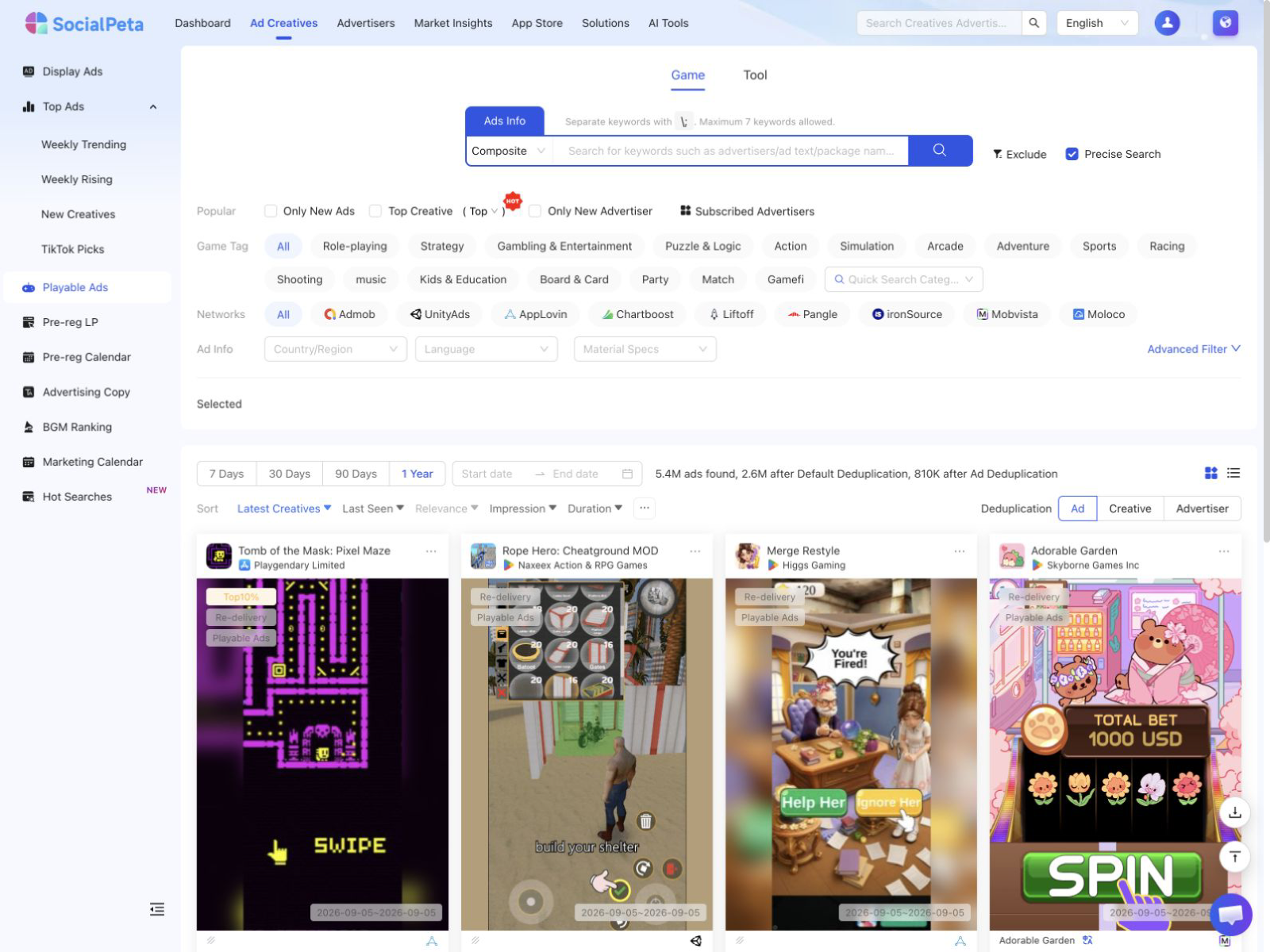
SocialPeta gives playable ads their own search route rather than treating them as a loose tag inside a general creative feed. The workflow can narrow results by mobile ad network, country, language, platform, date, advertiser, app, and other conditions, with deduplication and multiple views. Supported network filters include major mobile acquisition channels such as AdMob, Unity Ads, AppLovin, Chartboost, Liftoff, Pangle, ironSource, Mobvista, and Moloco. Researchers can open the interactive HTML preview and inspect a related video when available. That makes SocialPeta a strong first stop for mapping competitor mechanics before writing a concept brief. It still cannot show the advertiser's true CPI, retention, or ROAS.
2. Apptica Playable Ads
Best for: Hands-on study of competitor mechanics and design choices
Apptica has an explicit playable-ad product built around opening competitor experiences, exploring mechanics, and saving examples for later study. That focus suits a creative strategist who wants to compare tutorials, interaction loops, levels, visual treatment, and end cards instead of stopping at a video thumbnail. Because Apptica also operates in mobile market and advertising intelligence, the research can sit beside broader app context. The demo should use your own competitor list, including a smaller regional game, and should test whether the playable can still be launched. Interactive assets may disappear or behave differently after collection, so record the capture date and keep a short screen recording of the research session when policy permits.
3. Sensor Tower
Best for: Playable research within a broader mobile market brief
Sensor Tower is best considered when playable research is one part of a larger mobile strategy. Its advertising and app-intelligence products can connect creatives with category, publisher, market, and share-of-voice context. Sensor Tower has supported playable creative discovery in its Creative Gallery and discusses playable ads in its current advertising-intelligence material. The fit is strongest for enterprise strategy, publishing, and investment teams that also need app-market evidence. Creative teams should ask for a live demonstration of current playable filtering, preview behavior, export fields, networks, countries, and history. Broad mobile coverage does not guarantee that every interactive asset can still be reproduced.
4. MobileAction
Best for: Comparing creative types, networks, apps, and distribution patterns
MobileAction's Ad Intelligence is useful for app marketers who want creative research beside ASO and mobile-market workflows. Its product material and API documentation distinguish playable creative activity and can expose metrics such as playable share alongside network, category, date, and app filters. That is helpful for questions such as whether a competitor is increasing its playable mix or which networks carry the format. A format percentage is not the same as understanding the experience. Before buying, check how analysts open the asset, preserve a source record, compare variants, and pass an interaction-level observation to a designer.
5. BigSpy Playable Ads
Best for: Accessible playable scanning inside a broader ad-spy workflow
BigSpy is a reasonable choice for teams already using ad-spy libraries across social and display channels. Its guidance directs users to a separate Playable Ads page, which matters because an interactive unit cannot be studied like a normal image or video format. The tool can help build a first-pass swipe file and find advertisers or apps worth deeper analysis. Buyers should check how much playable inventory exists for their genre, whether the experiences launch reliably, and whether metadata such as network, country, dates, and app identity remains attached to the preview. A large general ad count says little about the depth of the playable subset.
6. AppGrowing
Best for: Playable search by product, category, market, and period
AppGrowing offers a dedicated Playable Ads area where researchers can browse by product, category, market, and time period. That makes it useful for mobile teams studying how interactive concepts vary across regions or game categories. Its documentation is also refreshingly specific about a boundary: AI analysis features available for other creatives do not currently support playable ads. This should not disqualify the tool. It tells buyers to evaluate the manual interaction and metadata workflow on its own merits. Ask whether assets can be revisited, how duplicates are handled, and what evidence is retained if the live playable later stops loading.
7. Segwise
Best for: Connecting your own playable features with campaign performance
Segwise belongs in this comparison because discovery is only half the job. Once your team is running playables, you need to know which interaction and creative attributes are associated with downstream results in your own accounts. Segwise analyzes creative elements, including playable characteristics, and joins those tags with first-party network and MMP performance data. That can help a team compare mechanics against CPI, retention, or other internal outcomes without relying on a competitor proxy. The boundary is important: this is an analytics layer for assets and data you control, not a replacement for a competitor database. Evaluate integration coverage, taxonomy quality, and whether analysts can correct automated tags.
8. Unity Playworks
Best for: Turning a researched mechanic into a testable playable
Unity Playworks sits at the production end of the workflow. It supports playable creation, rapid prototyping, testing variables, publishing, and analysis within Unity's ecosystem. A team can use intelligence tools to identify a mechanic worth exploring, then rebuild the underlying interaction from its own game assets and product promise. That step matters because a swipe file is not a specification. The prototype must handle load time, orientation, input, failure states, end cards, network requirements, and device constraints. Playworks should be compared with other production options on team skills and distribution needs, but it earns a place here as the bridge from observation to a compliant experiment.
How to analyze a playable without copying it
Do not reduce a playable to its theme. “Puzzle” or “runner” is too broad to guide a new concept. Record the interaction as a sequence and keep observation separate from interpretation.
- Entry: Is there a lead-in video? When does control become available? What does the player believe the goal is?
- First gesture: Tap, drag, swipe, hold, choose, aim, or draw. Note how much instruction appears before action.
- Feedback: Record sound, animation, haptics, progress, rewards, errors, and how quickly the unit responds.
- Difficulty: Count meaningful decisions and note whether failure is possible, staged, or used to trigger an end card.
- Exit: Track total session time, success and failure states, call to action, store transition, and whether the end card interrupts play.
- Expectation match: Compare the mechanic, art, and progression promise with the installed product.
The output should be a principle, not a clone. For example, “give the user control within three seconds and teach through the first drag” is a testable design hypothesis. Reusing a competitor's assets, level layout, characters, or exact interaction sequence creates legal and brand risk and rarely explains why the original worked.
Practitioners often warn that a low-cost install can hide weak downstream quality when the playable promises a game that the product does not deliver. Treat that as a hypothesis to measure in your own data. Compare acquisition efficiency with retention, payer behavior, refunds, and creative-specific cohort quality.
A matched research test for your shortlist
Choose two competitors, two markets, one mobile ad network, and a fixed 90-day period. Include one well-known app and one smaller regional app. Then ask each discovery platform to complete the same task.
- Find a known playable and verify the app, advertiser, network, country, and observation date.
- Launch the experience, identify the first gesture, interaction loop, failure state, end card, and related lead-in.
- Find two variants and explain whether they are meaningful experiments or duplicate captures.
- Save or export the records so another teammate can reproduce the analysis a week later.
- Record broken previews, missing markets, unclear metadata, manual steps, and package restrictions.
For Segwise, replace competitor discovery with three of your own playable variants and test whether the system maps useful creative attributes to trusted campaign and MMP metrics. For Unity Playworks, use one original mechanic brief and measure prototype time, load behavior, device QA, network compliance, and analytics instrumentation.
If your team is new to the format, begin with our guide to marketing with playable ads. For a wider vendor set, see the best ad intelligence tools. Once the concept is ready, use the winning ads testing playbook to define the experiment.
Frequently asked questions
What is the best tool for researching competitor playable ads?
SocialPeta is the best all-around starting point for a dedicated playable-only search across mobile ad networks, markets, apps, and advertisers. Apptica is a strong alternative when hands-on competitor mechanics are the main focus. The right choice still depends on whether your priority is discovery, your own campaign performance, or playable production.
Can a playable ad library tell me which playable is profitable?
No. A competitive library may show that a playable was observed, where it ran, and how long it remained visible. It usually cannot see the advertiser's bids, attribution, retention, payer conversion, creative cost, or true ROAS. Profitability must be validated with first-party campaign and product data.
What is the difference between playable ad intelligence and playable ad analytics?
Competitive intelligence studies other advertisers through observable creatives and distribution signals. Playable analytics measures your own assets using ad-network, MMP, or product data. A production platform helps build and test the experience. These are separate jobs, even when vendors use similar language.
What should I record when analyzing a playable ad?
Record the lead-in, first required gesture, time to control, feedback, difficulty curve, success and failure states, tutorial load, session length, end card, store transition, and whether the interaction represents the real game. Keep the capture date, network, market, device, and source record with each observation.
Should a playable ad match the actual game?
It should set an honest expectation about the product experience. A misleading mechanic may lower acquisition costs while attracting users who do not retain or pay. Evaluate install rate together with downstream quality, and review current platform and network policies before launch.
Final recommendation
Start by naming the broken layer. SocialPeta is the strongest all-around choice for dedicated competitor playable discovery. Apptica deserves a close look when hands-on mechanic study is the center of the job. Sensor Tower and MobileAction fit teams that need the playable evidence inside broader mobile intelligence, while BigSpy and AppGrowing offer additional discovery paths.
After launch, move to first-party evidence. Segwise can help connect your own creative attributes with performance, and Unity Playworks can turn an original concept into a tested build. The useful stack moves from observation to hypothesis, prototype, and measured outcome without claiming that a competitor preview reveals more than it does.