
Page analysis: connect SEO, user experience, and ad research
Use page analysis to diagnose SEO and conversion issues, review social advertising pages, and prioritize changes with a practical evidence checklist.
Page analysis examines whether a page can be found, understood, used, and trusted to complete its intended job. For a website URL, that includes SEO, performance, content, and conversion. For a social advertising Page, it includes identity, visible ads, promoted products, and destinations. Start by identifying which page you are analyzing and which decision the review needs to support.
Record the page's job and your access
Write down the URL, intended audience, desired action, source of traffic, market, and device. A blog post answering a research question has a different job from a checkout page. The same landing page may also behave differently for new visitors and returning customers.
List which evidence you can access. On your own site, you may have search and conversion data. On a competitor's site, you usually have the visible experience without its business outcomes. Keep that distinction in the report. A public page that looks persuasive has not thereby demonstrated a high conversion rate.
Capture the observation date and the route taken to the page. An ad destination may contain campaign parameters or open a localized version. A direct visit to the homepage can produce a different experience. If you remove parameters to make a URL readable, retain the original destination in the research record.
Define success before collecting scores. For example, a service page should explain the offer, qualify the inquiry, and make booking possible. A hundred audit checks can be technically correct while missing a broken booking step. The page's job gives you a way to prioritize findings.
Check whether the website can appear in search
For a URL you manage, inspect its indexing status before changing headings or adding keywords. Google's URL Inspection tool provides information about Google's indexed version and a separate live URL test. Distinguish the stored search view from what the site currently serves.
Check whether the page returns the intended content and whether its indexing directives and canonical point to the intended destination. A redirect to an unrelated page or an accidental exclusion can make content edits irrelevant to the immediate issue. Have the site owner investigate the exact finding rather than applying every suggestion from a generic audit.
A canonical is part of how duplicate or similar URLs are handled; do not treat a report about one URL as proof that all variants behave the same way. Record the inspected URL and the selected canonical where the tool provides it. Campaign destinations and clean editorial URLs may need different handling depending on the site.
Also distinguish eligibility from actual visibility. Resolving an indexing problem does not establish that the page answers a competitive query well enough to attract traffic. Once the technical barrier is understood, review the search intent and content rather than treating an indexable status as the end of the analysis.
Review content against the visitor's question
Read the page before opening a keyword checklist. Can a visitor quickly identify the subject, the intended audience, and the answer or offer? Does the page provide the information needed to take the next step? Content that uses the right terms can still leave a practical question unanswered.
For a comparison page, readers may need selection criteria and meaningful differences. For a product page, they may need price conditions, supported use cases, and evidence. For a tutorial, they need a sequence they can follow and a way to recognize when the task is complete. Choose the structure around that job.
Check titles and headings for clarity and consistency with the page. Review internal links as part of the journey: do they help the visitor resolve a question or move to the next step? A link to a related topic is useful when its relationship is clear, not simply because the anchor includes another keyword.
Do not add length to fix an undefined content problem. Identify the missing decision support. Perhaps the page needs an example, a limitation, a comparison, or an explanation of what happens after submission. A concise addition addressing the gap is more useful than several paragraphs restating the introduction.
Distinguish performance diagnostics from user outcomes
Google's PageSpeed Insights documentation distinguishes lab data from field data. Lab tests run under controlled conditions and help diagnose problems. Field data describes real-user experience where sufficient samples are available. A good lab score does not guarantee that all visitors have a good experience.
The source also explains that field data can fall back from a specific URL to origin-level data when samples are insufficient. Check that scope before reporting a result for one landing page. Otherwise, a site-wide experience can be mistaken for a measurement of the exact page you changed.
Use loading, responsiveness, and visual stability findings to locate practical friction. Does the main content appear late? Can a visitor interact with the form? Does a button move while someone is trying to tap it? Inspect the relevant device experience instead of only chasing a higher summary score.
A performance change should be checked against the page's job. Delaying a decorative widget might help loading without affecting the task. Delaying the only booking form could make the page harder to use even if an automated score improves. Test the complete interaction after the change.
Follow the ad promise through the destination
For paid traffic, analyze the ad and the page together. Record the promise in the ad, the evidence it uses, the call to action, and what the visitor sees next. A clear ad can still produce weak outcomes if the destination introduces a different offer or fails to explain the promised benefit.
Review the path on the target device. Check language, currency, product availability, required fields, validation messages, and the completion state. A form that accepts an email but gives no confirmation leaves the visitor uncertain. An app promotion that reaches the wrong store record breaks the research connection as well as the customer journey.
Consider a hypothetical campaign offering a free consultation. Its landing page opens with a long company history and hides the scheduling conditions below several sections. The first useful change may be to explain who the consultation is for, what it covers, and how to book. A headline color test would not address that uncertainty.
Use the advertising strategy guide when the ad's job itself is unclear. Use the Facebook page ad guide when the difficulty is finding the correct advertising identity or choosing how to create the campaign. Page analysis should lead to the right next task.
Analyze a social advertising Page in SocialPeta
Choose the source view that matches the identity: Facebook, Google, TikTok, or domain analysis. Ordinary Page search supports Page information or promoted products. Domain search supports domain information, promoted Pages, or related apps. Start with a known identity where possible and use discovery searches when you need to broaden the set.
The exact-search option preserves the keyword order rather than splitting the phrase. It can help narrow a distinctive Page name, but an overly strict query can miss a variant. If the result is empty, check the identity and filters before concluding that the advertiser has no activity.
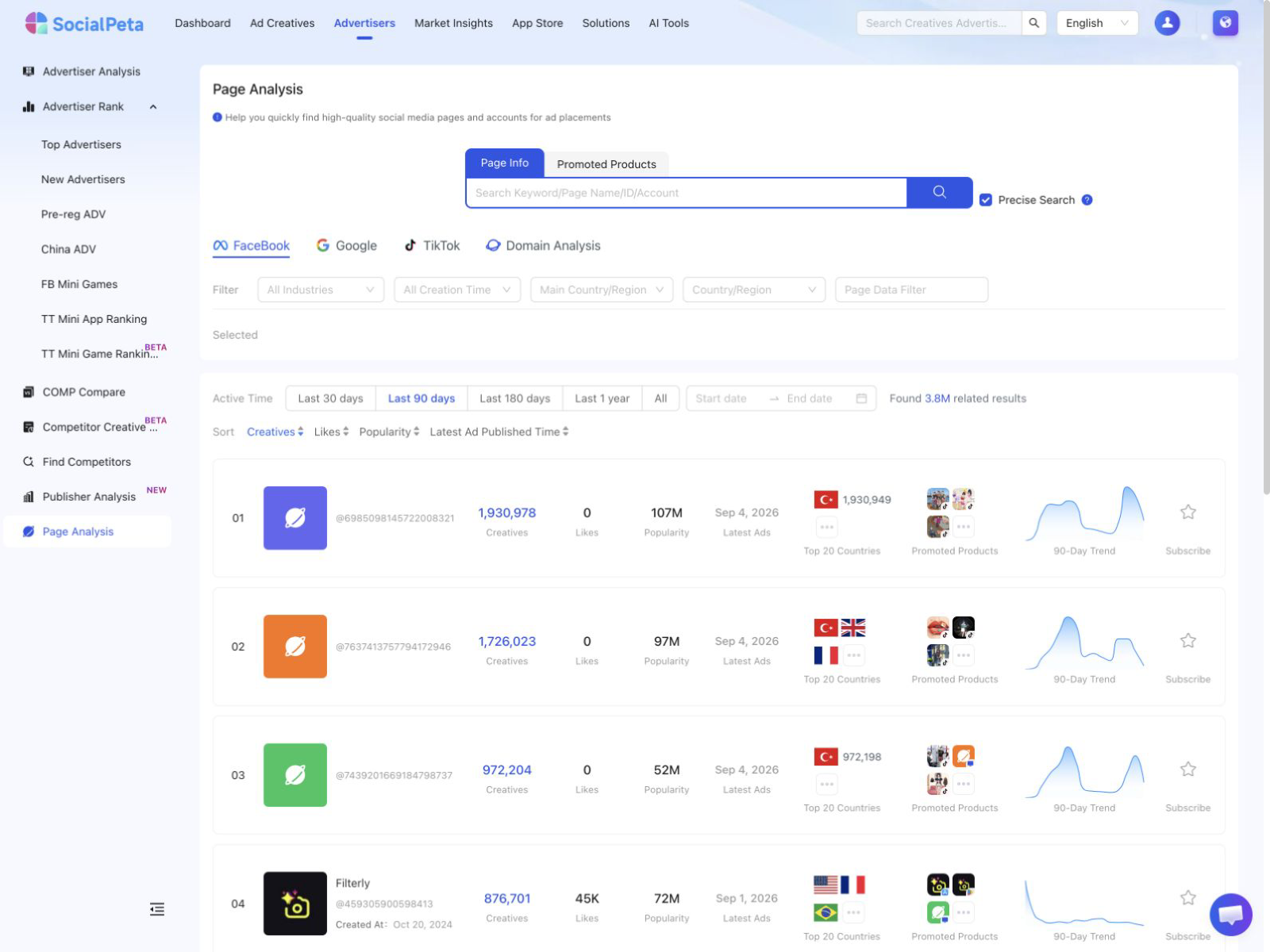
Set industry, country context, and active period deliberately. Facebook adds Page-creation and interaction filters; other source views expose different fields. Keep source-specific measurements separate. A Page's follower count, a creative count, and an estimated exposure metric answer different questions and should not share an unlabeled performance column.
The list supports subscribing to a Page, and entering its detail requires subscription in this workflow. In the detail view, review ad publishing trends, promoted products or domains, and relevant creative materials. The product associations are derived from ad content or landing pages, so verify important relationships against the actual product or store.
For Facebook-oriented creative review, narrow the materials with the available time, country, format, and channel controls. Compare the resulting ads with the destination you inspected earlier. This connects a visible advertising pattern to a specific offer without claiming access to the advertiser's private conversion data.
Prioritize findings with a decision table
Write each finding as an observable problem, its likely consequence, the evidence, and the next action. Avoid a long list of generic recommendations. The developer fixing the page should be able to reproduce the issue; the marketer should understand which visitor task it affects.
| Finding | First action | How to check the result |
|---|---|---|
| Intended public URL excluded from indexing | Investigate the directive and intended indexing policy | Inspect the corrected URL and subsequent indexing state |
| Ad promises an offer missing from the page | Reconcile the message and actual offer | Review the full path and qualified outcomes |
| Mobile form cannot be completed | Repair and reproduce on the affected device | Submit a test and confirm the completion state |
| Slow interaction around the primary action | Diagnose the relevant interaction | Recheck usability and appropriate performance evidence |
| Competitor Page search returns no matches | Verify identity, source, dates and filters | Repeat the scoped search and log the result |
Put blocking problems ahead of speculative refinements. A broken submission path deserves attention before a low-confidence copy preference. After repairs, choose a limited set of content or layout hypotheses that can be evaluated. Changing everything at once makes it difficult to understand why the outcome moved.
Label the confidence in the consequence separately from confidence in the observation. You may be certain a form has ten fields while uncertain that reducing them will improve qualified demand. The observation is reproducible; the business effect needs validation. This distinction keeps a sensible recommendation from becoming an unsupported promise.
Measure the change at the right level
Keep the before and after periods, audience, traffic source, and device mix in view. A rise in conversion rate after a page edit can coincide with more returning visitors or a different campaign. Treat a simple before-and-after result as an observation unless the comparison design supports a stronger causal claim.
For a hypothetical lead page, suppose 1,000 visits produce 40 inquiries and 10 qualified leads. After a change, 1,000 comparable visits produce 55 inquiries but still 10 qualified leads. The form conversion rate improved, but the qualified-lead rate did not. The analysis should investigate quality and expectations rather than celebrate the larger inquiry total alone.
Save the version, date, and reason for each meaningful change. Retain the original hypothesis and the actual result, including inconclusive outcomes. That record prevents a later team from repeating the same experiment because all it inherited was the newest screenshot.
The next page analysis should begin with a specific question left by the current one. It may concern indexing, offer clarity, performance, or advertising identity. Choose the matching evidence and resolve that question before expanding the audit to another part of the site.
Frequently asked questions
What is page analysis?
Page analysis examines how a page performs its intended job. Website analysis covers search visibility, content, usability, and conversion; social Page analysis examines advertising identities, visible ads, and associated products or destinations.
Can SocialPeta perform a technical SEO page analysis?
The Page Analysis workflow described here researches advertising Pages and domains. Use tools such as Google Search Console and PageSpeed Insights for technical search and website performance diagnostics.
Can I know a competitor page conversion rate from public information?
Usually not. Public content and ad observations can support hypotheses about the offer and experience, but the competitor conversion rate requires suitable private measurement or a clearly documented published source.