
Facebook page ad guide: create, find, and evaluate ads
Learn how to create a Facebook page ad, choose between boosting and Ads Manager, find competitor ads, and troubleshoot identity and performance problems.
A Facebook page ad is a paid advertisement associated with a Facebook Page. You can promote an eligible existing post or create advertising through Meta's campaign tools, then measure the response against your business goal. To research another Page's ads, use the Meta Ad Library and confirm the Page identity. Creating your own ads and inspecting a competitor's ads are separate workflows, with different access and evidence.
Understand the Page, post, and ad relationship
A Facebook Page represents the business or other public identity. A post is content published through that Page. An ad is paid delivery of an advertising message. A boosted post uses an existing post as the basis for paid promotion, while a campaign can use a different creative setup.
Do not expect every ad to appear as a normal post on a Page's public timeline. Looking only at recent posts can miss advertising. Equally, an engaging organic post has not necessarily received paid distribution. Use the relevant ad tools to establish what you are looking at before making performance comparisons.
Meta's Page ad creation overview introduces advertising directly from a Page. Its training on boosted posts and Ads Manager covers both workflows. The right choice depends on the control and measurement your campaign needs.
Keep the identities in your records. Your personal login provides access, the Page is the public identity, and the ad account contains advertising and billing activity. An app promoted by that Page has a separate store record and developer. Confusing these objects makes both setup and competitor research harder to troubleshoot.
Choose between boosting and Ads Manager
Boosting is useful when an existing eligible post already expresses the message you want to promote and the available controls support your goal. Ads Manager is the fuller campaign workspace when you need to manage campaign structure, ad sets, and ads in more detail. Neither option makes a weak offer effective by itself.
| Situation | Starting approach | What to check |
|---|---|---|
| Promote an existing announcement | Review the post's available boost options | Eligibility, goal, audience, budget and duration |
| Build a campaign with several ads | Use Ads Manager | Campaign goal, ad-set settings and Page identity |
| Compare original creative concepts | Plan the comparison in campaign tools | Comparable conditions and a defined outcome |
| Investigate another business's ads | Use the Ad Library | Correct Page, country, category and filters |
Choose the outcome before selecting the interface. If the business needs qualified inquiries, cheap reactions are not a sufficient success measure. If the goal is to introduce a new local business, the measurement may differ from a purchase campaign. The available setup should support the job you actually need done.
Avoid paying to promote a post simply because it performed well organically. Its audience, distribution, and context may differ under paid delivery. Check whether the post states the offer clearly for someone unfamiliar with the Page and whether its destination still works. Existing engagement is context, not a guarantee of future business results.
Prepare the identity, offer, and destination
Before creating the ad, confirm that you have the access needed to use the intended Page and ad account. Review the account's current status and the payment setup in Meta's interface. A Page being visible to your profile does not by itself resolve every advertising permission or account issue.
Prepare the offer in ordinary language. Specify the product or service, the audience, the benefit, any material conditions, and the next step. Have the final image or video, copy, and destination ready. If the creative promises a consultation, a trial, or a discount, the destination should explain the same offer.
For app advertising, check the exact store destination and developer information. A similar product name can lead to the wrong record, particularly across platforms or markets. The ad publisher developer research guide explains how to record App Store and Google Play identities without treating them as the Facebook Page itself.
Test the customer path on a mobile device. Read the text at the size it will appear, check important content near image or video edges, and complete the destination action. Confirm that a form submission or purchase reaches the expected completion state. A successful preview is only part of a successful launch.
Create a Facebook page ad step by step
For a promoted post, start from the eligible post and review the available promotion controls. Select the goal, audience, duration, and budget that fit the offer. Inspect the preview and destination before submitting it for review. Meta's advertising fundamentals training covers goal, audience, budget, and placement choices for boosting.
For a campaign in Ads Manager, start a campaign and select the goal corresponding to the business outcome. At the ad-set level, review the delivery settings available for that campaign, including the relevant audience and placement choices. At the ad level, confirm the Page identity and prepare the creative and destination.
Use the controls available in your account rather than following an old screenshot literally. Meta's interfaces and options can differ by campaign setup and account context. The durable sequence is to define the outcome, configure delivery, select the identity, check the message and destination, and review the budget before publishing.
At the final review, inspect names as well as visuals. A correctly designed ad under the wrong Page is still an incorrect setup. Check the ad account, Page, selected destination, schedule, and spending settings together. Make sure someone is responsible for reviewing delivery and responding to the leads or messages the ad generates.
Submission is not the same as delivery. After publishing, inspect the status in the advertising tool and resolve any stated review, billing, or setup issues through the available account workflow. Do not assume that a successful click on the publish control means the campaign has started spending or reaching people.
Set a budget that fits the learning question
Choose an amount the business can afford and a duration appropriate to the response being measured. Include the time needed for people to complete the action. A consultation request and a considered purchase may not happen at the same speed, so judging both after the same short interval can mislead.
A small budget is easier to interpret when it supports a narrow question. Comparing a few meaningfully different messages may be more useful than dividing it across many tiny variations. Decide which distinction would change the next creative brief or spending decision before producing the assets.
Define the primary outcome and a quality check. For a local service, that may be a qualified inquiry with a serviceable location and relevant need. For an app, it may be activation after installation. Record what would make you continue, revise, or stop, and distinguish clear implementation failures from uncertain performance.
For broader budget planning, use the advertising strategy guide. It explains how the allowable acquisition cost depends on your economics. There is no universal daily budget or click-price target that makes every Facebook campaign viable.
Find the ads a Facebook Page is running
Open the Meta Ad Library, select the relevant country and ad category, and search for the advertiser or Page. For ordinary commercial research, use the general ads category offered by the interface. Confirm the Page name and identity before collecting examples.
Meta's ad and Page transparency announcement explains the purpose of making a Page's active ads visible even to people who were not shown those ads. Use the library for direct observation of available advertising, while respecting the scope and fields shown for the selected ad type and location.
You may also find an Ad Library link through Page transparency information when the current interface provides it. If the shortcut is missing, go directly to the library. Do not treat a moved menu item as evidence that the advertiser stopped running ads or that its public advertising has disappeared.
Record the creative, copy, call to action, destination, and observation date. Keep identifiers supplied by the library where available so you can revisit the same example. A thumbnail without its copy or destination is incomplete evidence of the message a customer encountered.
Treat commercial spend, targeting, and outcome information cautiously. Public fields differ by jurisdiction and ad category. Do not assume that every commercial ad exposes a complete budget, audience strategy, or ROAS. An active ad or a long-running execution can suggest a useful research question; neither proves profitability.
Use SocialPeta to extend Page research
In SocialPeta Page Analysis, select Facebook and search by Page information or promoted product. The workflow includes exact search, industry and country context, active-time filters, and Facebook-specific Page and interaction filters. These help narrow the research set before examining individual creatives.
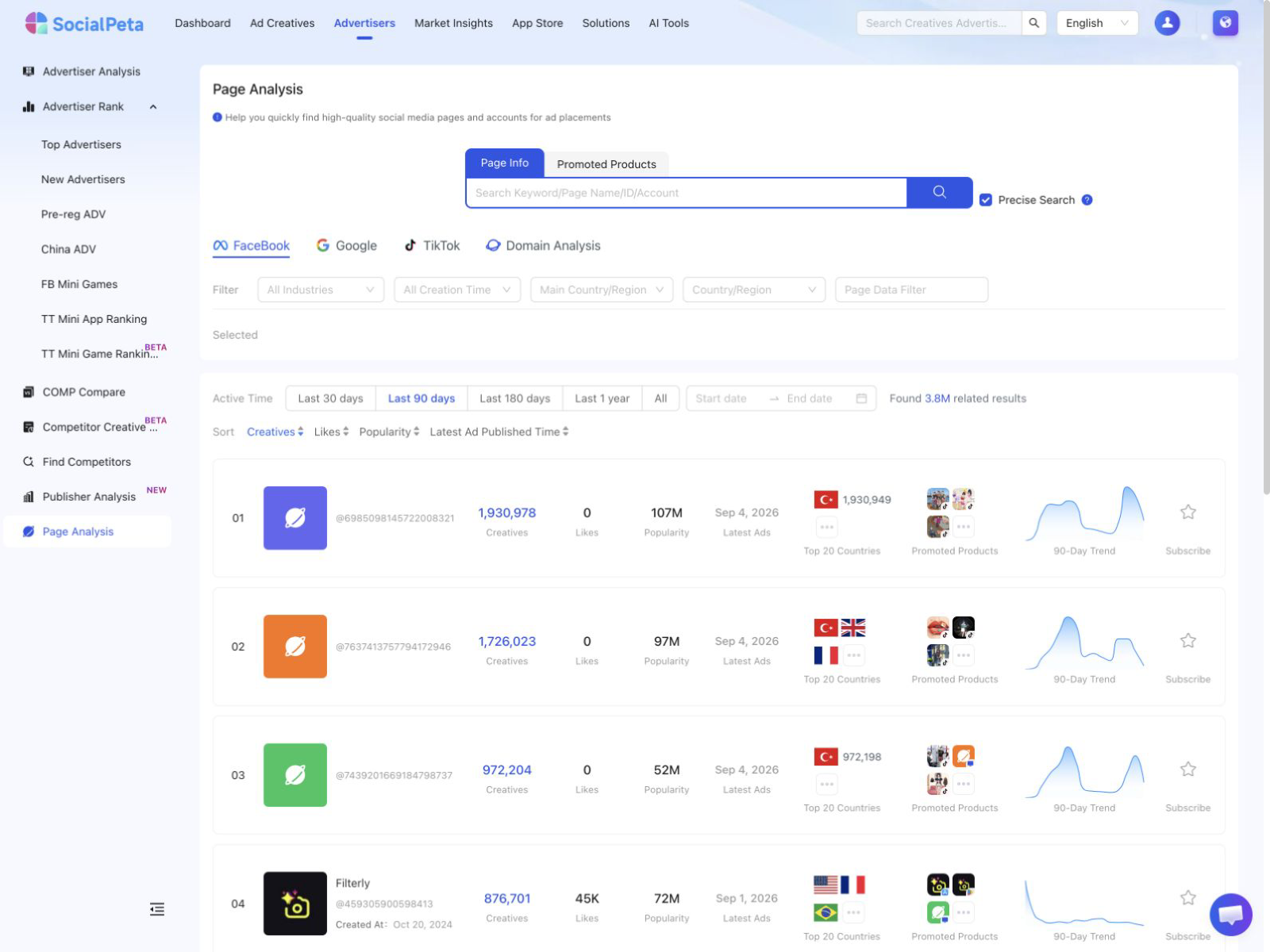
If a name search returns too many candidates, use a more distinctive identifier or check the promoted product. If it returns none, loosen exact matching and review the country and time filters. Keep the search record so a teammate can distinguish an empty query result from a confirmed absence of advertising.
The list supports Page subscriptions; the detail entry requires subscription in this workflow. The detail view can show ad publishing trends, promoted products or domains, and creative materials. For Facebook, the available creative filters include channel, country, material type, and time. Use comparable conditions when reviewing several Pages.
Compare message and destination patterns rather than simply ordering Pages by likes or creative count. A Page with many followers may have built them over years under a different offer. A Page with many creatives may contain variants of the same idea. These signals help organize investigation, while your own measured outcomes determine whether an idea works for your business.
Troubleshoot the exact symptom
Start with what the tool reports and which object is affected. The Page identity, ad account, post eligibility, campaign configuration, and library filters are separate potential sources of trouble. Changing all of them at once can hide the cause and create additional work.
| Symptom | First checks | Interpretation to avoid |
|---|---|---|
| Page is not available when creating an ad | Intended account, Page access and account status | The creative itself must be the problem |
| Boost option is unavailable | Post eligibility and the explanation in the interface | Creating another Page will solve it |
| Submitted ad is not delivering | Status, schedule, spending settings and billing messages | It has already failed with the audience |
| Page has no matching library results | Identity, country, category and search filters | The business never advertises |
| Clicks arrive but inquiries do not | Destination, form and offer continuity | More budget is the first fix |
Use official account help for unresolved access or restriction issues. Read the specific explanation rather than following a generic sequence that recreates assets. A new Page does not resolve the original identity question and makes historical comparisons harder. Keep the error message and the affected account details available for the person responsible for administration.
For missing competitor results, repeat the search with a broader period or fewer filters where available. Verify the Page through the advertiser's official presence. If the evidence remains incomplete, record that limitation. A research report is stronger when it admits an unresolved lookup than when it invents a reason for missing ads.
Evaluate the business result after launch
Review delivery first, then response quality. Check that the intended ad ran, the destination worked, and the relevant event was recorded. Only then compare creative or audience outcomes. This prevents a measurement failure from becoming a false conclusion about customer demand.
Suppose a hypothetical campaign spends $300 and produces 30 inquiries, of which six meet the business's qualification criteria. The cost per inquiry is $10, but the cost per qualified inquiry is $50. If a new ad produces more inquiries without more qualified ones, the apparent improvement may add work without improving the business result.
Ask what happens after the counted event. Do qualified inquiries become appointments? Do appointments turn into suitable customers? For app advertising, do new users complete the task the ad demonstrated? Review those outcomes over an appropriate period before deciding that a cheap intermediate action deserves more spending.
Keep the next change focused on the finding. Repair a broken path, clarify an offer attracting the wrong audience, or test a different proof mechanism. The page analysis guide helps diagnose the destination, while the ad research workflow helps convert public examples into an original creative brief.
Frequently asked questions
What is a Facebook page ad?
A Facebook page ad is paid advertising associated with a Facebook Page. It can use an eligible existing post or creative prepared through campaign tools. The Page identity, public post, and ad account are related but separate objects.
How can I see another Facebook Page ad?
Search for the correct Page in the Meta Ad Library, then check the country, ad category, and available filters. Confirm the identity before collecting examples, and record the observation date and destination.
Does a long-running Facebook ad prove that it works?
No. Longevity is a public observation, not proof of profitability. Budget, delivery, business objectives, and conversion quality can differ. Use the ad as a research lead and validate an original idea with your own results.